Realtime visitors for all your websites on one screen
Last updated October 31, 2026
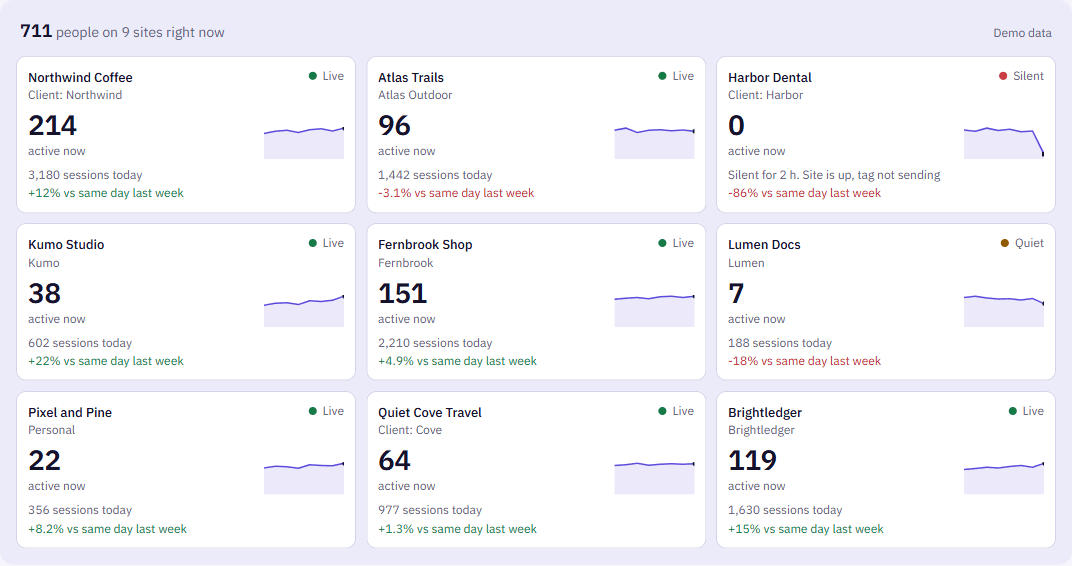
To see realtime visitors for several websites at once, connect the Google accounts that own their GA4 properties to SilenceRadar. Its Radar screen shows the active users of every property side by side, refreshed every 30 seconds, with today's sessions against the same weekday last week and a 7-day trend for each site.
Why the GA4 realtime report isn't enough
Google Analytics shows realtime data one property at a time. If you run eight sites you open eight tabs, and if those sites sit in different Google accounts you also switch logins. Looker Studio can combine properties, but its Google Analytics connector does not return realtime data.
The Radar asks the Google Analytics Data API for each property's active users in the last 30 minutes, the same number the GA4 realtime card shows, and lays every site out on one screen.
What each site shows
- Active users in the last 30 minutes, refreshed every 30 seconds while the page is open.
- Sessions so far today, compared with the same weekday last week up to the same hour, so a Tuesday morning is compared with a Tuesday morning.
- A seven-day sparkline of daily sessions.
- A status: live, quiet, silent or no data. Silent means the site is getting no visitors at a time it normally has them.
Built for many sites
Sort by visitors right now, by the biggest drop, or by name. Pin the sites you check first, hide the ones you never look at, and group sites by client or brand to filter the Radar to one group. Press Ctrl K to jump to any site by name.
Open a site to see its last 30 minutes minute by minute, today's top pages, its tracking health grade and its silence settings.
Where the numbers come from
The live count is the activeUsers metric from the realtime endpoint of the Google Analytics Data API: people who were active on the site in the last 30 minutes. It is the same figure as the Users in last 30 minutes card in the GA4 Realtime report, so the two agree.
Sessions today are counted in each property's own reporting time zone, the one set in GA4, so a site reporting in Tokyo and a site reporting in New York each start their day at their own midnight. The comparison with last week stops at the same hour, so a half-finished day is never compared with a whole one.
Every request is made with the Google account that owns the property, using read-only access. Live counts are reused for up to 30 seconds and daily figures for up to 10 minutes, which keeps a big portfolio well inside Google's API quotas.
Put it on a screen
Any board can run in present mode on a TV or tablet. It refreshes on its own and can rotate between boards every minute, which suits an agency office or a support desk.
Live numbers keep updating while the page is visible and pause when the tab is in the background, then catch up the moment you come back. A refresh button reloads everything at once if you want to check right now.
Questions
How often does the Radar update?
Live visitor counts refresh every 30 seconds while the page is visible. Daily figures and sparklines refresh every 10 minutes.
Is the live count the same as in Google Analytics?
Yes. It is the active users in the last 30 minutes from Google's realtime API, the same number as the Users in last 30 minutes card in the GA4 Realtime report.
Can I see realtime visitors for properties in different Google accounts?
Yes. Connect each Google account once and the Radar shows the properties from all of them together. Each request uses the account that owns the property.
Does it work with Universal Analytics?
No. Universal Analytics stopped processing data in 2023. SilenceRadar works with Google Analytics 4 properties.
Can I use it on a phone?
Yes. The Radar and boards work on phones and tablets, and present mode runs full screen on a TV or tablet.
Is there a limit on sites?
No. Connect as many Google accounts and properties as you have for $9 a month or $90 a year after a 7-day free trial without a card.