The GA4 dashboard for agencies
Last updated October 31, 2026
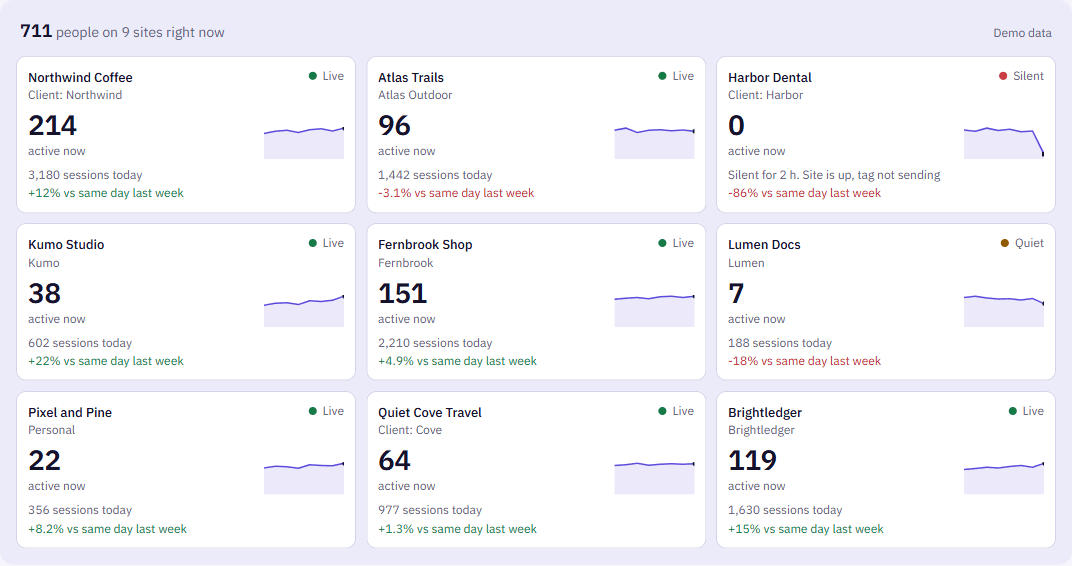
For agencies, SilenceRadar shows every client's GA4 property on one live screen, across all the Google accounts clients have added you to, and emails you when a client site goes silent. Boards can be shared with clients as read-only links or sent as scheduled reports, for a flat $9 a month regardless of how many sites you manage.
What agencies use it for
- A morning check of every client site in one glance, sorted by the biggest drop.
- Finding out about a broken tag after a client's redesign within hours, not at month end.
- A board per client, shared as a read-only link or embedded in a client portal.
- Weekly or monthly email reports per client, sent automatically.
- A live board on the office screen.
Organising many clients
Create a group per client and filter the Radar, pickers and multi-site widgets by group. Hide properties that aren't yours to watch. Connect each Google login your clients used to give you access (how); the page on managing multiple Google Analytics accounts shows how to see all those sites in one dashboard.
A morning check in two minutes
- 1
Open the Radar
Every client site is on one screen with its live visitors and today against the same weekday last week.
- 2
Sort by the biggest drop
The sites that need attention rise to the top. Anything silent is already marked, and you have had the email.
- 3
Open the site that looks wrong
See its last 30 minutes, top pages today and tracking health grade, then jump to GA4 or the client's board if you need more.
Catch tracking problems before the client does
Most client analytics problems are not traffic problems. A tag dropped in a redesign, a consent banner that blocks Analytics, or a Tag Manager container nobody published all show up as a quiet site. Silence watch flags these within hours, and the site check says whether the site is down or the tag is the problem.
Each property also gets a measurement health grade from a few checks: whether data arrived today, how much traffic the last seven days had, whether the bounce rate looks plausible, whether traffic comes from more than one source, and whether more than a handful of pages are being tracked.
Client reporting
Give each client a board and send it by email daily, weekly or monthly, or share a read-only link they can open without an account. The link can be embedded in a client portal, and you can turn it off when the engagement ends. An executive brief sums up a property's key numbers and changes for a period, for clients who don't read charts.
One price, however many clients
SilenceRadar costs $9 a month or $90 a year after a 7-day free trial without a card. There are no per-client, per-site or per-account fees, so adding a client never changes your bill.
Questions
Do clients need a SilenceRadar account?
No. Share a board as a read-only link or embed it, or send it as a scheduled email report. Clients see only the board you share.
Can I connect properties from many client Google accounts?
Yes. Connect every Google login that has access to client properties. All their properties appear together, and each one is read with the account that owns it.
Can my whole team use one SilenceRadar account?
Accounts are for one person today. Colleagues can follow boards through read-only links and receive alerts by email or in a shared Slack channel.
Is there a per-client fee?
No. One plan, $9 a month or $90 a year after a 7-day free trial without a card, covers unlimited clients, Google accounts and properties.