One live GA4 screen for every brand you run
Last updated November 26, 2026
For a company with several brands, SilenceRadar puts the GA4 property of every brand, country and campaign site on one live screen, across all the Google accounts those properties sit in, groups them by brand or region, and emails you when a site goes silent. It reads GA4 with read-only access, needs nothing installed on the sites, and costs a flat $9 a month however many sites you watch.
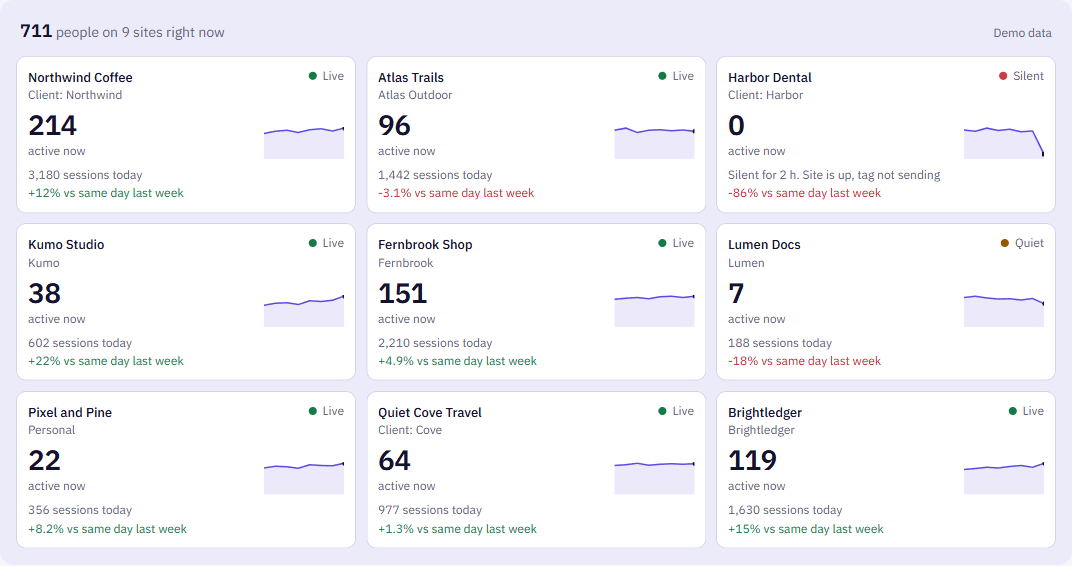
What multi-brand teams use it for
- A morning look at every brand's sites on one screen, sorted by the biggest drop against the same weekday last week.
- A group per brand or region, so the Radar, the property pickers and the across-sites widgets show one brand at a time.
- Hearing within hours that a country site or a campaign microsite stopped being counted after a release, instead of at month end.
- A board that compares brands side by side, running on the office screen in present mode.
- Scheduled email reports per brand, for brand managers who don't open Google Analytics.
Properties spread across Google accounts
Brand sites are often set up at different times by different teams or agencies, so their GA4 properties can sit in several Google Analytics accounts reached with different logins. Google Analytics shows one property at a time, so checking every brand means switching properties and, often, accounts.
In SilenceRadar you connect each Google login once (how), and every GA4 property those logins can see is listed together. Each report is requested with the account that owns the property, so nobody shares a password, and Viewer access to a property is enough. More on managing multiple Google Analytics accounts.
Country and regional sites
Sessions today are counted in each property's own reporting time zone, the one set in GA4, so a site reporting in Tokyo and a site reporting in New York each start their day at their own midnight. Each site is compared with the same weekday last week up to the same hour, so a half-finished day in one region is never compared with a whole one.
Group sites by region as well as by brand, and filter the Radar to the group you are responsible for. Pin the sites you check first and hide properties you have access to but don't need to watch.
Catch a silent site after a release
A redesign that drops the tag, a consent banner change that blocks Analytics, or a measurement ID switched to another property all make a site's reports go quiet while the site itself looks fine. With many brands, nobody notices until a monthly report looks wrong.
Silence watch covers every watched property with no setup. It learns when each site normally has visitors, tells you when one stops, and loads the site to say whether it is down or the tag is broken. Alerts go to your email, extra addresses, a shared Slack channel or a signed webhook, and a second message arrives when visitors return.
Reports for brand owners
Give each brand a board, share it as a read-only link or embed it in an intranet page, or send it by email daily, weekly or monthly as a short summary or a full report. Viewers don't need an account. An executive brief sums up a property's key numbers and changes for a period, and a Monday digest gives you every site's week against the week before, with the biggest movers and any silences.
What IT and security will ask
- Access is read-only (the analytics.readonly scope). SilenceRadar can't change properties, users, tags or settings.
- Nothing is installed on your sites: no extra script and no effect on page speed.
- Access tokens are stored encrypted, report values are held in a cache for at most 10 minutes, and Google data is never sold or used for advertising.
- Disconnecting a Google account deletes its token straight away.
When something else fits better
If your company is on Google Analytics 360, roll-up properties combine up to 200 source properties into one property inside GA4, Realtime report included; only 360 properties can be sources (Google's help page). If you need one report that blends GA4 with ads, CRM or sales data, a KPI or reporting platform such as Geckoboard or Databox does more. SilenceRadar works with standard GA4 properties and adds the live view and the silence alerts on top.
Accounts are for one person today. Colleagues follow boards through read-only links and scheduled reports, and receive alerts by email or in a shared Slack channel.
Questions
Can we see brands whose GA4 properties are in different Google accounts?
Yes. Connect each Google login that can see some of the properties. They are all listed together, and each one is read with the account that owns it.
Do we need Google Analytics 360?
No. SilenceRadar works with standard GA4 properties. Roll-up properties, which combine several properties inside GA4, need Analytics 360.
Can we watch only the brands we are responsible for?
Yes. Group properties by brand or region, filter the Radar by group, and hide the properties you don't need to watch.
Can the whole marketing team use one SilenceRadar account?
Accounts are for one person today. Colleagues can follow boards through read-only links and scheduled reports, and receive alerts by email or in a shared Slack channel.
Does the price depend on the number of brands or sites?
No. One plan, $9 a month or $90 a year after a 7-day free trial without a card, covers unlimited Google accounts and properties.