How to see GA4 realtime data for multiple properties at once
Last updated October 31, 2026
GA4's Realtime report shows one property at a time, and Looker Studio's GA4 connector has no realtime data. To watch realtime visitors for several properties together you can open each property's Realtime report in its own tab, call the realtime endpoint of the Google Analytics Data API yourself, or use a dashboard built on it, such as SilenceRadar, which shows every property side by side and refreshes every 30 seconds.
What GA4 Realtime shows
The Realtime report covers activity in the last 30 minutes for standard properties: users, where they came from, the pages they are on and the events they trigger (source 1). It is scoped to the property you have open, and the property picker only lists properties that the signed-in Google account can access.
Option 1: one tab per property
Bookmark each property's Realtime report and open them in tabs, or tile browser windows on a big screen. It costs nothing and needs no setup. It stops working well past a handful of sites, and properties that live under different Google logins need separate browser profiles.
Option 2: the Data API's realtime endpoint
The Google Analytics Data API has a runRealtimeReport method that returns realtime metrics such as activeUsers for one property per request (source 2). A script can loop over your properties, call it for each one and show the results together, in a spreadsheet, a wallboard or your own dashboard.
You take care of the rest yourself: OAuth for every Google account involved, refreshing tokens, staying within the API's quotas, retries when Google rate-limits you, and somewhere to display it. Each realtime request uses quota, so polling many properties every few seconds adds up quickly.
Option 3: a multi-property realtime dashboard
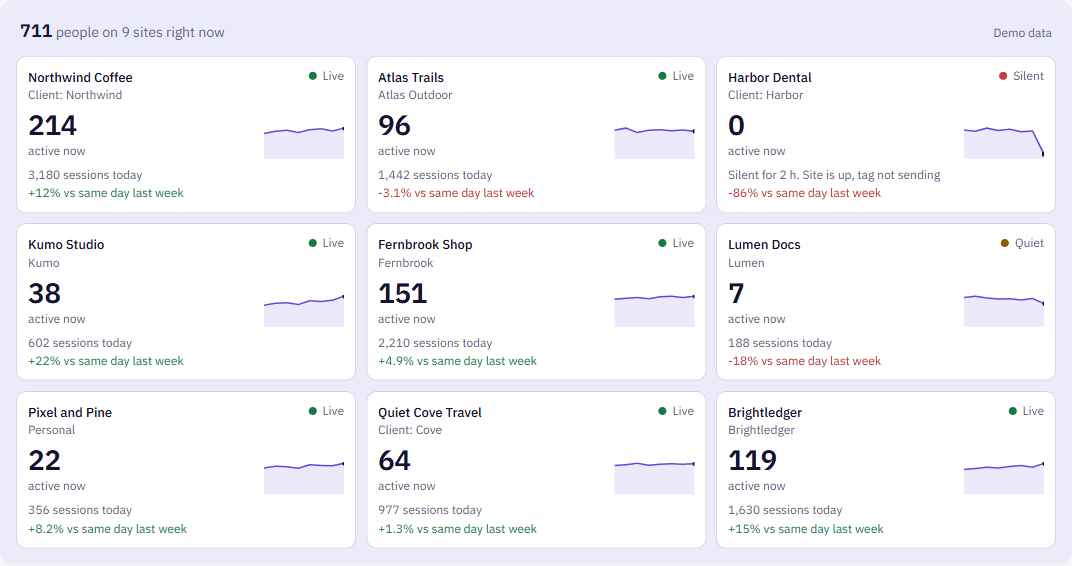
SilenceRadar does option 2 for you. Connect each Google account once with read-only access, and the Radar shows the active users of every property side by side, refreshed every 30 seconds while the page is open, with today's sessions against the same weekday last week and a seven-day trend for each site. Requests are made with the account that owns each property and cached briefly, which keeps large portfolios inside Google's quotas.
Because it is watching anyway, it also tells you when a site stops getting visitors: silence alerts check every watched property every 15 minutes, even when nobody has the page open.
The options side by side
| Tabs | Your own Data API script | SilenceRadar | |
|---|---|---|---|
| Setup | Bookmarks | Code, OAuth and hosting | Connect Google accounts |
| Properties from several Google logins | Separate browser profiles | Yes, if you build it | Yes |
| Refresh | Manual or the report's own | As you build it | Every 30 seconds |
| Alert when a site goes silent | No | If you build it | Built in |
| Cost | Free | Your time and hosting | $9 a month after a free trial |
Sources
- 1. Google Analytics Help, Realtime report: https://support.google.com/analytics/answer/9271392
- 2. Google for Developers, Create a realtime report (Data API): https://developers.google.com/analytics/devguides/reporting/data/v1/realtime-basics
Questions
Can GA4 show realtime data for multiple properties?
Not in its own interface. The Realtime report is scoped to one property. Seeing several together needs the Data API's realtime endpoint or a dashboard built on it.
Does Looker Studio show GA4 realtime data?
No. Looker Studio's Google Analytics connector reads GA4's regular reporting data, which arrives with a processing delay, so it can't show who is on your sites right now.
How far back does GA4 realtime go?
The last 30 minutes for standard GA4 properties.
Is the Radar's live count the same as GA4's?
Yes. SilenceRadar shows active users in the last 30 minutes from Google's realtime API, the same figure as the GA4 Realtime report.