Is my website down, or is Google Analytics broken?
Last updated October 31, 2026
When GA4 suddenly shows no visitors, find out first whether the site is down or only the tracking is broken. Load the site from another device or network: if it doesn't load, the site is down and visitors really are missing. If it loads, open the GA4 Realtime report and visit a page: if you don't appear, the tag isn't sending data, and visitors are arriving without being counted.
Tell them apart in five minutes
- 1
Load the site somewhere else
Open it on your phone over mobile data, not your office Wi-Fi. A site that works for you can still be down for everyone else because of DNS, a CDN or a cached copy in your browser.
- 2
Check the response
If the page fails, note what you see: a browser error (DNS or certificate), a 5xx error page (the server or host), or a blank page (often a broken deploy). That is a site problem, not an analytics one.
- 3
Visit with GA4 Realtime open
If the site loads, open the property's Realtime report and click through a few pages. If you appear within a minute, tracking works and the drop is real traffic.
- 4
Check the tag
If you don't appear, run the GA4 tag checker on the site. It shows whether the page still loads a GA4 tag or Tag Manager and which measurement ID it uses.
- 5
Compare with another source
Your host, CDN or server logs count requests without any JavaScript. Normal traffic there with nothing in GA4 confirms a tracking problem.
How the two problems look
| Check | Site down | Tracking broken |
|---|---|---|
| Site loads from another network | No, or with errors | Yes |
| Your visit appears in GA4 Realtime | No | No |
| Uptime monitor | Alerts | Stays green |
| Host, CDN or server traffic | Drops or errors | Normal |
| Visitors and sales | Really lost | Still happening, but not measured |
If the site is down
- Check your host's and CDN's status pages, and whether the domain or TLS certificate has expired.
- Roll back the last deploy if the failure started right after it.
- Once the site is back, GA4 picks up again on its own. The missing hours are real lost visits, not missing data.
If tracking is broken
- Look at the most recent change: a redesign, theme or plugin update, a Tag Manager edit that wasn't published, or a new cookie banner.
- Make sure the measurement ID on the site matches the web stream of the property you are looking at.
- Test with cookies accepted and with cookies rejected; a consent setup can block Analytics for most visitors. See why GA4 data dropped after a cookie banner.
- Work through the full checklist in GA4 not showing data.
- Data GA4 never received can't be added afterwards, so annotate the gap in your reports.
Catch both without checking by hand
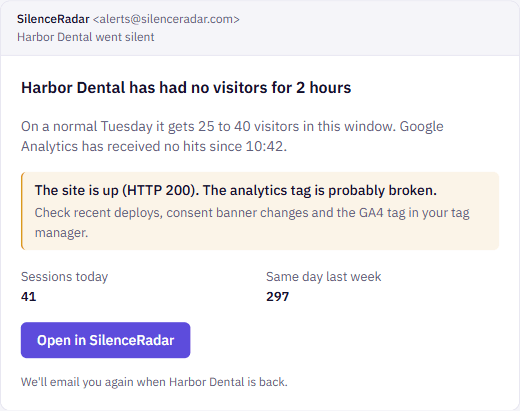
An uptime monitor catches a site that is down but not a broken tag. A traffic alert in GA4 catches a drop but doesn't say why. SilenceRadar's silence alerts do both: when a watched site stops getting visitors at a time it normally has them, SilenceRadar loads the site and emails you either that it is down, with the error it saw, or that it is up but Google Analytics is receiving nothing.
Questions
Why does GA4 show zero visitors when my site is working?
The Google tag isn't sending data: it was removed, Tag Manager changes weren't published, the measurement ID points to another property, or a consent setup blocks it. Visit the site with the GA4 Realtime report open to confirm.
How do I know if my website is down for everyone?
Load it from a different network, such as your phone on mobile data, or use an uptime monitor that checks from outside. Your own browser can show a cached copy.
Can a website be up while Google Analytics records nothing?
Yes. The page can load normally while the analytics tag is missing, blocked or misconfigured. Visitors still arrive; GA4 just doesn't count them.
Does GA4 recover data from when the tag was broken?
No. GA4 only records what the tag sends at the time, so the gap stays in your reports.